 Data & charts studio

Import data, chart it, run analyses and publish a report — one workspace, free.
Chartroom is a data workspace that runs in your browser. Import CSV, TSV or Excel files, draw live charts, then send the same dataset through site tools for time-series trends and anomalies, maps, statistics and A/B tests, freshness checks, unit conversion and address checks. Public datasets (electricity, public spending, package downloads, web archive, satellite images) flow in as tables, snapshots compare data over time, and everything ends in one report with clear findings that you can print, embed or share.
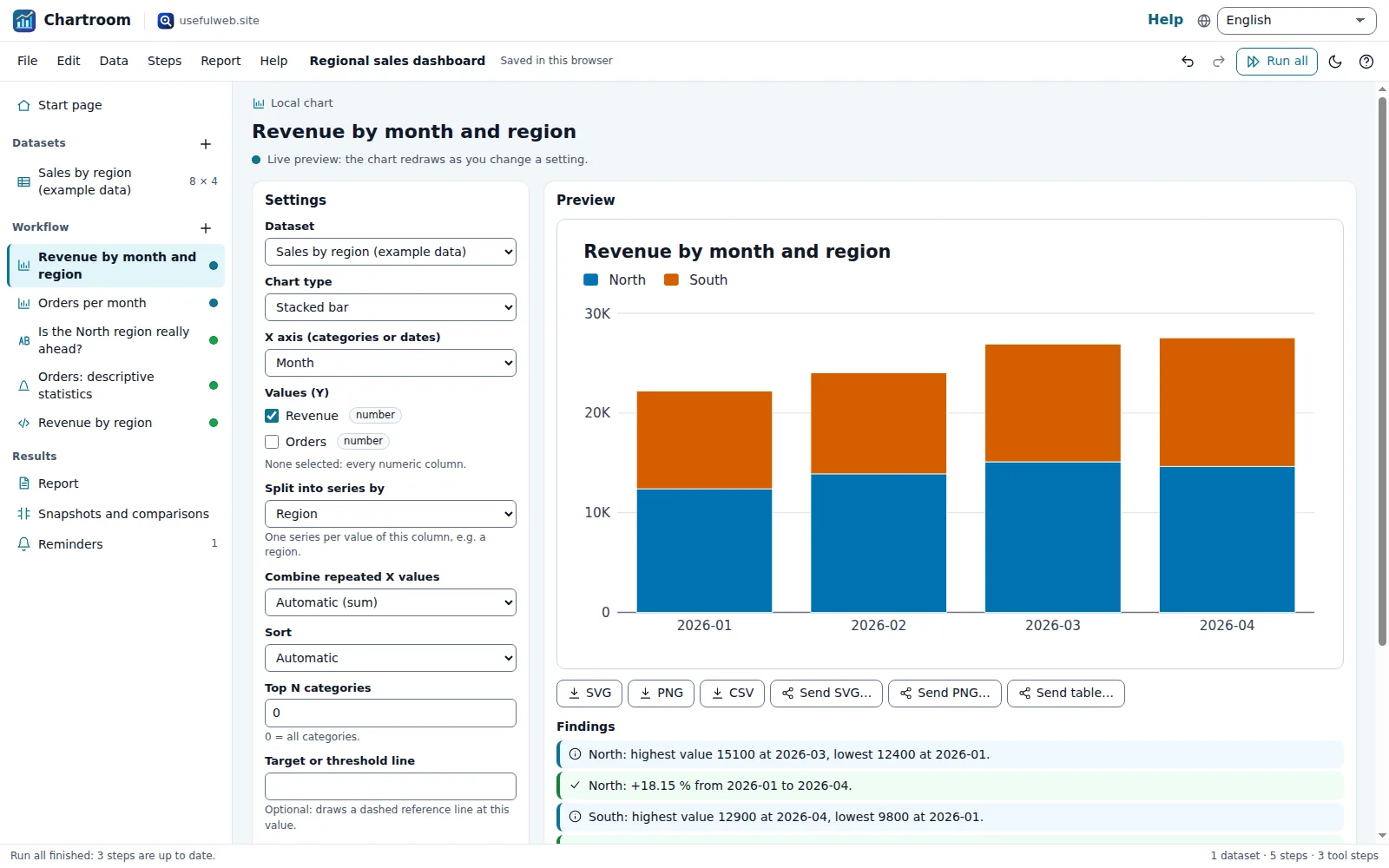
Screenshots
- Live chart with its settings and the project workflow
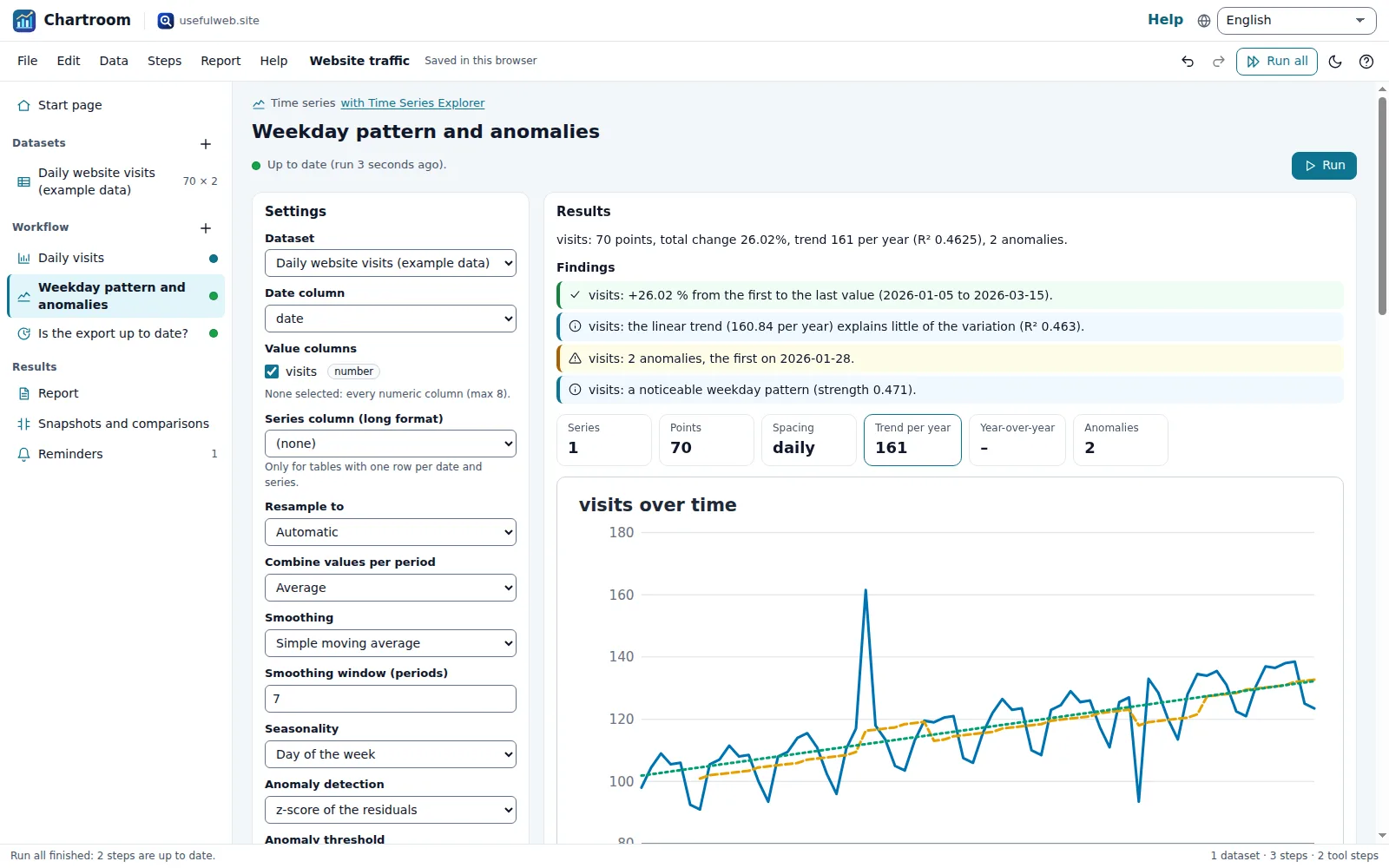 Trend, seasonality and anomalies as plain findings
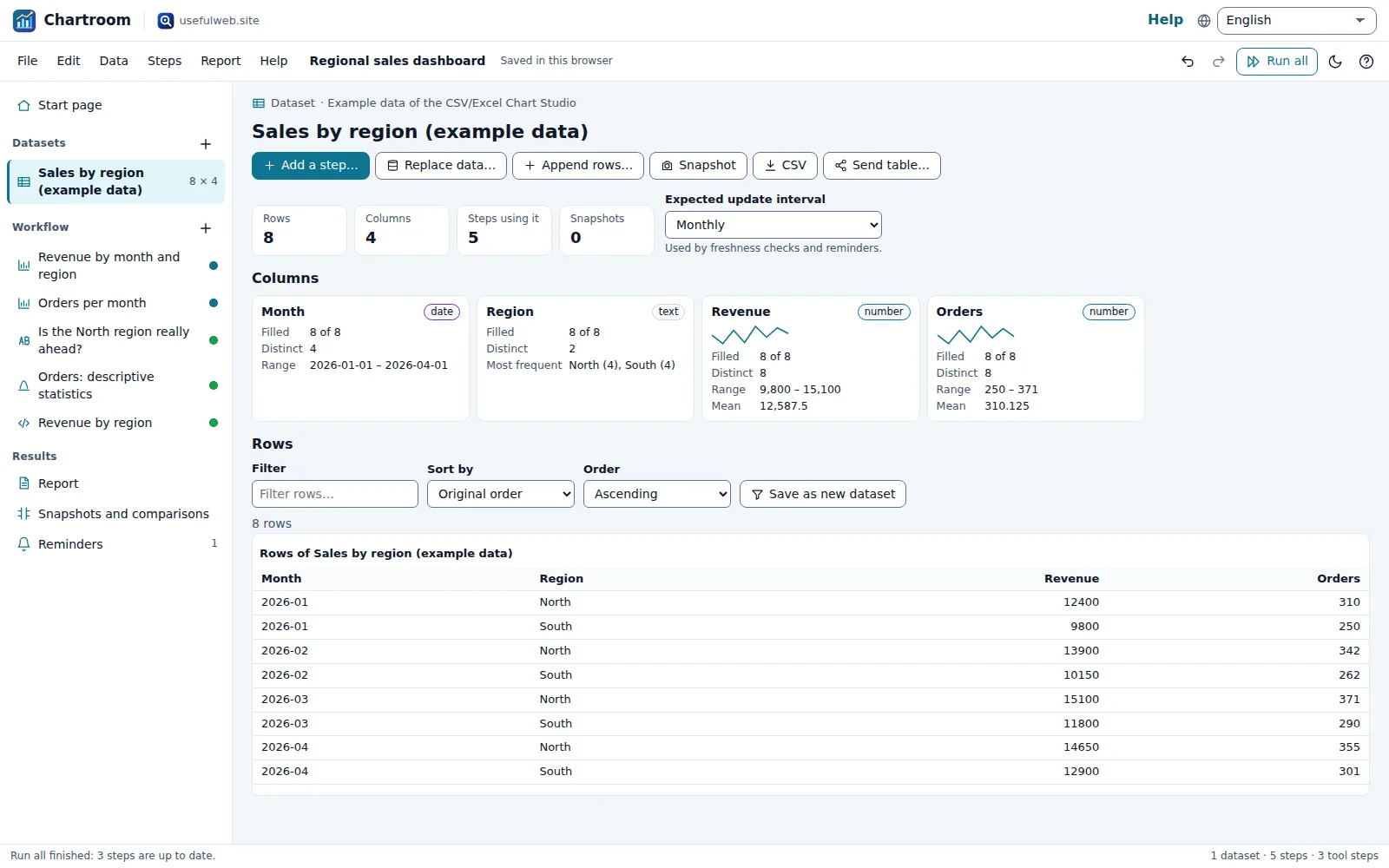 Data view with column profiles
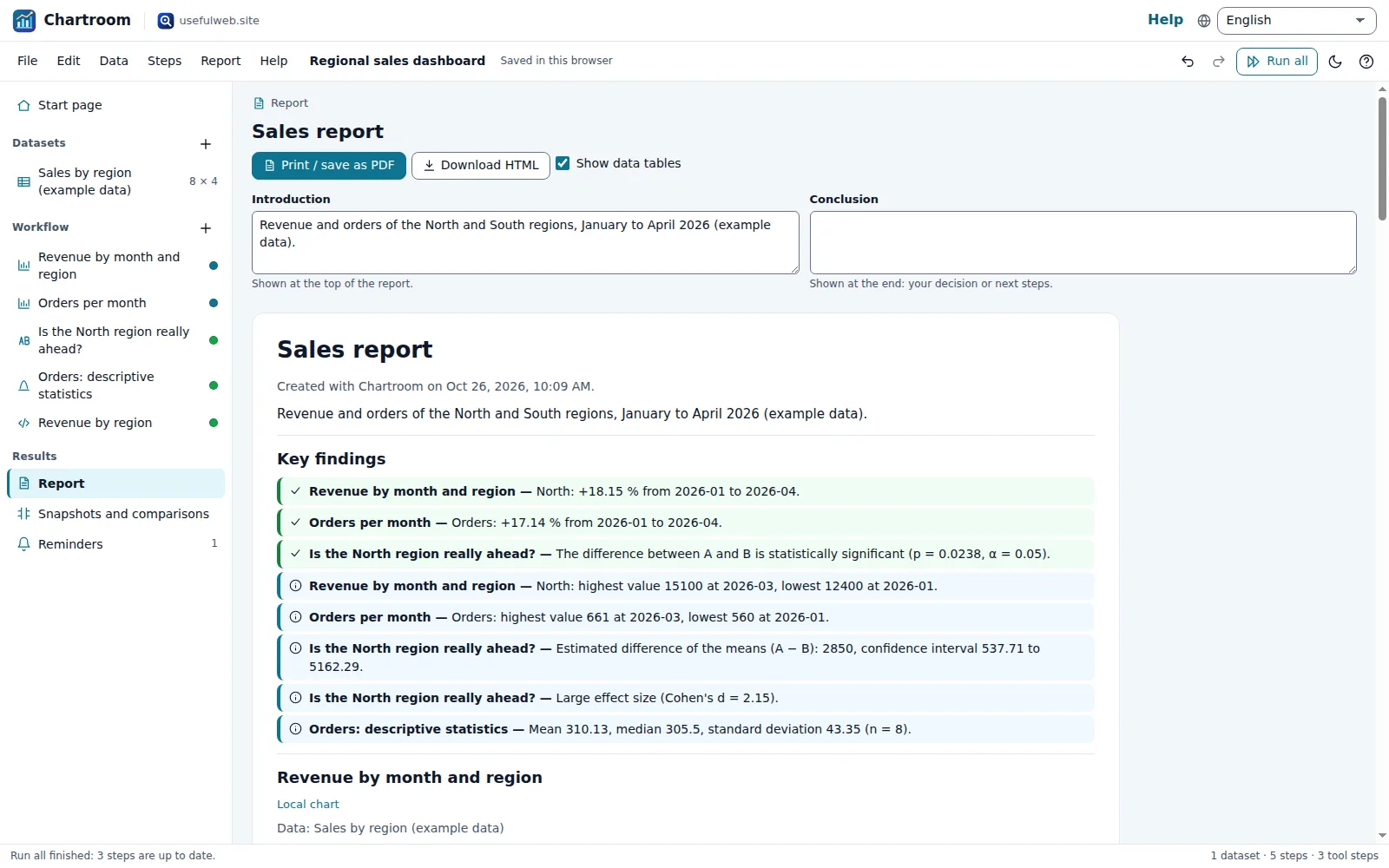 One report for the whole project
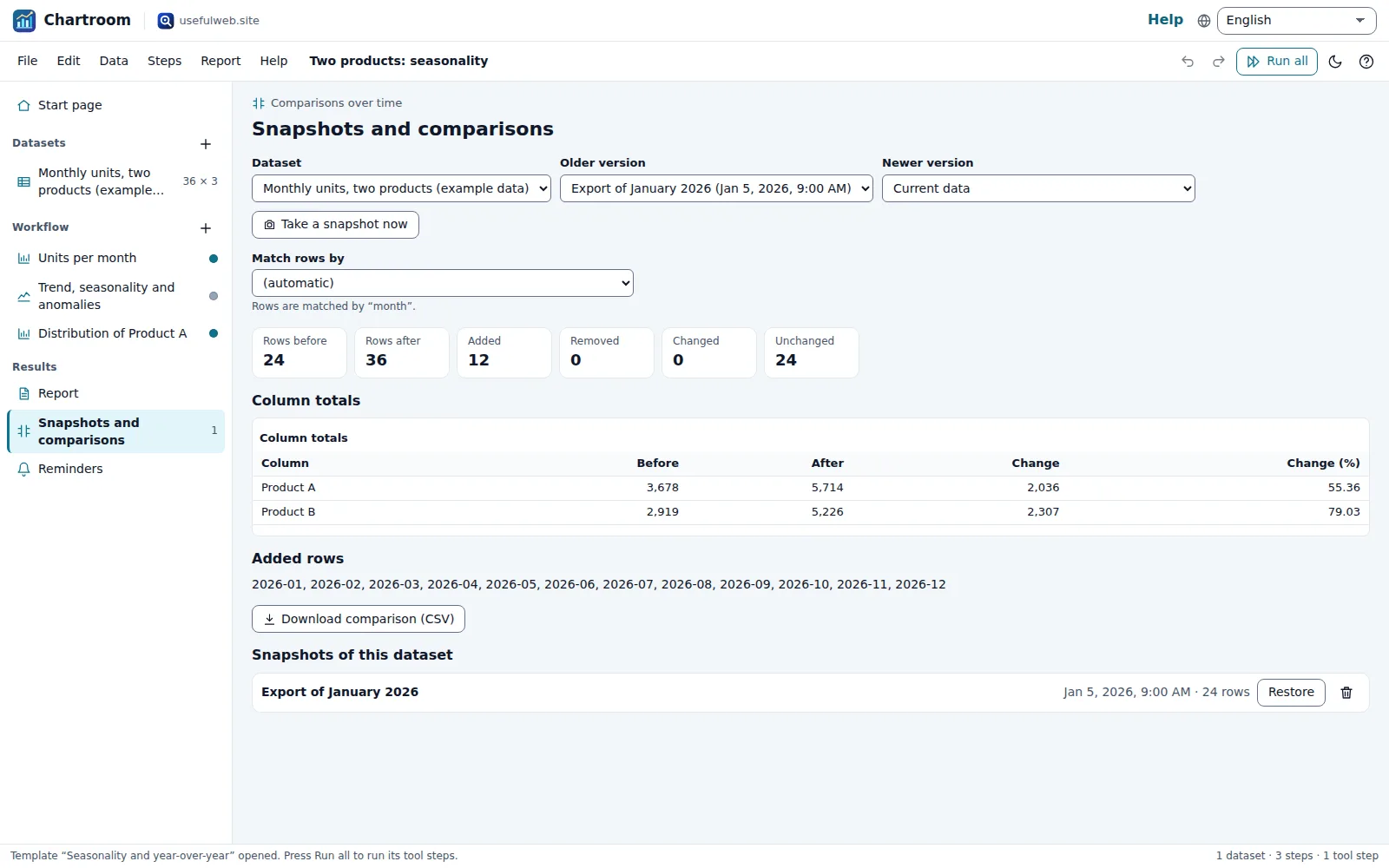 Compare a dataset with an older snapshot
 Maps from country codes or coordinates (dark theme)
Features
Data workspace
Paste a table or open CSV, TSV or Excel (.xlsx) files: they are read on your device, columns are typed (numbers, dates, text) and profiled with missing values, ranges and top values.
Live charts
Line, area, bar, stacked, horizontal bar, scatter, pie, donut and histogram with grouping, aggregation, top N and a target line — the preview redraws as you change a setting.
One dataset, many tools
Add workflow steps that run site tools on the same data: chart studio, time-series explorer, geo visualizer, statistics studio, DataFresh, UnitProof and LocaleKit.
Trends and anomalies
The Time Series Explorer finds the trend, weekday or monthly seasonality and unusual values; Chartroom turns them into plain findings.
Maps and diagrams
Points, proportional circles, hexbins and choropleths from coordinates or country codes, plus flowcharts — including a diagram of how data flows through your project.
Statistics and A/B tests
Descriptive statistics, confidence intervals and Welch t-tests between two groups or two columns, with p-value, effect size and a sentence that says what it means.
Public datasets
Fetch electricity generation and prices, public spending awards, npm/PyPI/crates downloads, Wayback Machine page changes and satellite before/after images straight into the project.
Reusable preparation recipes
Trim spaces, change case, remove duplicates, split a column or left join another dataset in an ordered recipe with a live preview. The result is a new dataset that remembers its recipe: re-run it when the source changes, or download the recipe and load it in another project.
Data checks and unit conversion
DataFresh tells you whether an export is stale and which fields appeared or vanished; LocaleKit checks postal codes and phone numbers row by row; UnitProof verifies a column conversion (miles to km, °F to °C …) before Chartroom applies it.
Comparisons over time
Snapshots keep earlier versions of a dataset: see added, removed and changed rows and how column totals moved. Re-runs show how each finding changed since the last run.
Run all, in order
One click refreshes public data and re-runs every step with progress, retry and automatic pauses when the server asks for them; outdated results are marked.
Report and dashboard
Every chart, map and finding in one report with your introduction and conclusion — print it to PDF, export standalone HTML embeds or download the charts as SVG and PNG.
Refresh reminders
Plan when each dataset needs new data and export the reminders to your calendar as an .ics file with repeating events.
Local-first projects
Autosave and recent projects in your browser, project files, undo/redo, share links, Google Drive saving when signed in — no account needed.
Hand data between apps
Send charts (SVG/PNG) and tables to other usefulweb apps and open tables or JSON from them, without uploading anything.
API and MCP
Every tool Chartroom uses is available as a JSON API and MCP tool, and agents can build projects from the documented JSON schema.


Templates
Start from a ready-made project and change it to fit.
Regional sales dashboard
Revenue and orders by month and region: stacked bars, an order trend, a North-vs-South t-test, descriptive statistics and an embeddable chart for your website.
Seasonality and year-over-year
Three years of monthly units for two products: line chart, trend and seasonality from the Time Series Explorer, and a snapshot comparison with an older export.
Website traffic: trend and anomalies
Ten weeks of daily visits: weekday pattern, trend and anomaly detection, a freshness check of the export and a weekly reminder to refresh it.
Offices and customers on maps
Two datasets on world maps: proportional circles for staff per office, a choropleth of customers by country and a top-10 bar chart.
Open-source package adoption
Fetch a year of weekly npm downloads for chart.js, then chart them and let the Time Series Explorer find the trend. Change the package to track your own.
Electricity mix of a country
Fetch yesterday’s public net generation, prices and cross-border flows from Energy-Charts, then chart the generation mix as a donut and ranked bars.
Built-in tools
Chartroom uses these tools. Each one also has its own page and works on its own, in the browser, through the JSON API and through MCP.
- CSV/Excel Chart StudioTurn CSV, TSV or Excel data into line, bar, pie, scatter or histogram charts with SVG/PNG export.
- Time-Series ExplorerResample, smooth and decompose date/value data: trend, R², seasonality, YoY change and anomalies.
- Geo Data VisualizerMap CSV coordinates or GeoJSON as points, proportional circles, hex-bin heatmaps or choropleths.
- Diagram & Flowchart MakerWrite flowcharts, sequence diagrams and mind maps as text and get a laid-out SVG/PNG diagram.
- Embeddable Chart BuilderMake a self-contained chart to embed anywhere: inline SVG, standalone HTML, accessible snippet.
- Probability & Statistics StudioDistributions, descriptive stats, confidence intervals and t, chi-square and z tests with p-values.
- DataFreshIs this dataset or API still fresh? Newest record, update cadence check and schema drift.
- UnitProof Unit CalculatorUnit maths you can audit: dimension check, exact factors and a full derivation tree.
- LocaleKit Country Format RulesAddress form fields, postal-code regex, calling code and date formats for any country.
- Energy Grid ExplorerGeneration mix, load, renewable share, cross-border flows and power prices for European grids.
- Public Spending ExplorerSearch government contracts and grants: who pays whom, totals per agency and vendor.
- Software Adoption ExplorerOpen-source usage signals: weekly downloads, growth and version adoption for npm, PyPI, crates.
- Internet Archive Change ExplorerSee how a web page changed in the Wayback Machine: capture timeline plus the changes that matter.
- Satellite Change ExplorerCompare NASA satellite images of any place on two dates: true colour, NDVI, night lights.
For AI agents
Chartroom runs on a deterministic engine. The same functions are available as tools with a JSON API and MCP, so scripts and AI agents get exactly the results the app shows.
- CSV/Excel Chart Studio – Turn CSV, TSV or Excel data into line, bar, pie, scatter or histogram charts with SVG/PNG export.
Tool page ·POST https://chartroom.usefulweb.site/api/v1/tools/csv-excel-chart-studio/calculate· MCPcsv_excel_chart_studio - Time-Series Explorer – Resample, smooth and decompose date/value data: trend, R², seasonality, YoY change and anomalies.
Tool page ·POST https://chartroom.usefulweb.site/api/v1/tools/time-series-explorer/calculate· MCPtime_series_explorer - Geo Data Visualizer – Map CSV coordinates or GeoJSON as points, proportional circles, hex-bin heatmaps or choropleths.
Tool page ·POST https://chartroom.usefulweb.site/api/v1/tools/geo-data-visualizer/calculate· MCPgeo_data_visualizer - Diagram & Flowchart Maker – Write flowcharts, sequence diagrams and mind maps as text and get a laid-out SVG/PNG diagram.
Tool page ·POST https://chartroom.usefulweb.site/api/v1/tools/diagram-flowchart-maker/calculate· MCPdiagram_flowchart_maker - Embeddable Chart Builder – Make a self-contained chart to embed anywhere: inline SVG, standalone HTML, accessible snippet.
Tool page ·POST https://chartroom.usefulweb.site/api/v1/tools/embeddable-chart-builder/calculate· MCPembeddable_chart_builder - Probability & Statistics Studio – Distributions, descriptive stats, confidence intervals and t, chi-square and z tests with p-values.
Tool page ·POST https://chartroom.usefulweb.site/api/v1/tools/probability-statistics-studio/calculate· MCPprobability_statistics_studio - DataFresh – Is this dataset or API still fresh? Newest record, update cadence check and schema drift.
Tool page ·POST https://chartroom.usefulweb.site/api/v1/tools/datafresh/calculate· MCPdatafresh - UnitProof Unit Calculator – Unit maths you can audit: dimension check, exact factors and a full derivation tree.
Tool page ·POST https://chartroom.usefulweb.site/api/v1/tools/unitproof/calculate· MCPunitproof - LocaleKit Country Format Rules – Address form fields, postal-code regex, calling code and date formats for any country.
Tool page ·POST https://chartroom.usefulweb.site/api/v1/tools/localekit/calculate· MCPlocalekit - Energy Grid Explorer – Generation mix, load, renewable share, cross-border flows and power prices for European grids.
Tool page ·POST https://chartroom.usefulweb.site/api/v1/tools/energy-grid-explorer/calculate· MCPenergy_grid_explorer - Public Spending Explorer – Search government contracts and grants: who pays whom, totals per agency and vendor.
Tool page ·POST https://chartroom.usefulweb.site/api/v1/tools/public-spending-explorer/calculate· MCPpublic_spending_explorer - Software Adoption Explorer – Open-source usage signals: weekly downloads, growth and version adoption for npm, PyPI, crates.
Tool page ·POST https://chartroom.usefulweb.site/api/v1/tools/software-adoption-explorer/calculate· MCPsoftware_adoption_explorer - Internet Archive Change Explorer – See how a web page changed in the Wayback Machine: capture timeline plus the changes that matter.
Tool page ·POST https://chartroom.usefulweb.site/api/v1/tools/internet-archive-change-explorer/calculate· MCPinternet_archive_change_explorer - Satellite Change Explorer – Compare NASA satellite images of any place on two dates: true colour, NDVI, night lights.
Tool page ·POST https://chartroom.usefulweb.site/api/v1/tools/satellite-change-explorer/calculate· MCPsatellite_change_explorer
- MCP endpoint (Streamable HTTP):
https://chartroom.usefulweb.site/mcp - Project file format (JSON Schema): https://chartroom.usefulweb.site/project.schema.json
- OpenAPI description: /openapi.json · llms.txt · API & MCP
Build a project through the API, then open it in the app with a link to https://chartroom.usefulweb.site/app#project=<base64url JSON>.
Import & export
Import
- CSV, TSV, TXT (comma, semicolon, tab or pipe)
- Excel workbook (.xlsx, read on your device)
- JSON (array of objects or headers + rows)
- Chartroom project (.chartroom.json)
- Project link (#project=…)
- Tables and JSON from other usefulweb apps
Export
- Chartroom project (.chartroom.json)
- CSV per dataset and per chart
- SVG and PNG charts
- Standalone HTML chart and embed snippet
- Printable report (PDF via print)
- Calendar reminders (.ics)
- Snapshot comparison (CSV)
Keyboard shortcuts
| Keys | Action |
|---|---|
| Ctrl + Z / Ctrl + Y | Undo / redo |
| Ctrl + S | Save project file |
| Ctrl + O | Open project or data file |
| Ctrl + Enter | Run the selected step |
| Ctrl + Shift + Enter | Run all steps |
| Ctrl + P | Print the report |
| N | Add a step |
| I | Import data |
| R | Open the report |
| Alt + ↑ / Alt + ↓ | Previous / next item in the project |
| Delete | Delete the selected item (in the project list) |
| ? | Keyboard shortcuts |
Frequently asked questions
Is Chartroom free, and where is my data?
Yes. Projects are saved in your browser (IndexedDB) and as files you download. Local charts, the data view, snapshots and comparisons run on your device. When you run a tool step, the dataset (or the settings for public data) is sent to usefulweb.site’s API for that one calculation; results come back into your project.
Which file formats can I import?
CSV, TSV and other delimited text (comma, semicolon, tab, pipe; decimal commas are detected per column), Excel .xlsx workbooks (read locally, cached formula values are used) and JSON arrays of objects. Old .xls files need to be saved as .xlsx or CSV first.
What is the difference between a local chart and a chart studio step?
A local chart is drawn instantly in your browser while you edit. The CSV/Excel Chart Studio step renders the same kind of chart on the server with its own column detection, and returns SVG and PNG files plus the data table — useful as a second opinion and for exports.
Why does a step say it has to wait?
Heavy tools (charts, maps, time series, diagrams) are limited to a few calls per minute per visitor and public-data tools to about fifteen. Chartroom queues the steps, waits as long as the server asks and then continues on its own; you can keep editing meanwhile.
How do comparisons over time work?
Whenever a public-data step refreshes a dataset or you replace its data, Chartroom keeps a snapshot of the old version. Compare shows added, removed and changed rows and how column totals moved. Every step also remembers its last runs, so the report can say how a metric changed since the previous run.
Can I share a project?
Yes: save the .chartroom.json file, use Google Drive when you are signed in, or copy a share link. Share links contain the datasets and steps but not the tool results (they would make the link too long); the recipient presses Run all.
What does Prepare data… do to my original dataset?
Nothing. The recipe runs on a copy: operations apply in order (trim, lowercase/uppercase, remove duplicate rows, split at the first delimiter, left join on exact key values) and the result is saved as a new dataset. That dataset keeps the recipe, so Re-run recipe applies it again to the current source data, and Edit recipe… changes it; both are undoable. Joins keep rows without a match and repeat a row when several rows match.
Can an AI agent build a Chartroom project?
Yes. The project format is published as a JSON schema at /project.schema.json; an agent can create datasets and steps and open them with /app#project=<base64url JSON>. All fourteen tools are available through the app’s JSON API and MCP server.
Limitations
What Chartroom does not do (yet):
- Datasets are limited to 50,000 rows and 200 columns per table (5 MB of CSV text in a project); heavy analyses take at most 2 MB per tool call.
- Tool steps need a connection to usefulweb.site; offline you can still edit data, draw local charts, compare snapshots and read stored results.
- Excel formulas are not recalculated: the values cached in the file are used. Charts and pivot tables inside workbooks are not imported.
- Satellite images open from NASA’s servers in a new tab; the workspace shows their metadata and dates, not the pictures themselves.
- Row-by-row checks (postal codes, phone numbers) run up to 500 rows per batch and respect the API rate limit, so large batches take a few minutes.
- There is no live database connection or scheduled background refresh: refreshes run when you press Run all, and reminders go to your own calendar.
- Tool results are shown in English when the tool itself does not translate them yet.
- Preparation recipes offer six operations (trim, lowercase, uppercase, remove duplicates, split at a delimiter, exact-key left join) — no formulas, type conversions or fuzzy matching — and re-run only when you press Re-run recipe.
Tutorials
Learn Chartroom step by step.
- Your first chart and report in 5 minutesPaste a table, pick a chart type, add an analysis step and print a report — the whole Chartroom workflow with your own data, no account needed.Beginner 5 min
- Import CSV and Excel files the right wayHow Chartroom reads delimiters, decimal commas, dates and Excel workbooks, how to replace or append data, and how snapshots protect the old version.Beginner 6 min
- Trends, seasonality and anomalies in time seriesSend a date-based dataset through the Time Series Explorer, read the trend, weekday or monthly pattern and anomalies, and track how they change between runs.Intermediate 7 min
- Public datasets, snapshots and comparisons over timeFetch electricity, spending, package-download or web-archive data into a dataset, refresh it with Run all and compare every refresh with the previous version.Intermediate 8 min
- Maps, embeddable charts and diagramsTurn coordinates or country codes into world maps, publish a self-contained chart on your website, and draw a flowchart of how data moves through your project.Intermediate 7 min
- Data checks, batch runs and automation with the APICheck freshness and schema drift, convert a column with a verified factor, validate postal codes row by row, and build Chartroom projects from scripts or AI agents.Advanced 9 min
- Clean and join data with reusable recipesUse Prepare data… to trim, split, deduplicate and join a dataset in an ordered recipe, save the result as a new dataset and re-run the recipe when the source changes.Intermediate 7 min
Ready to try it?
Other premium apps
-

Kerfwise
Cabinet & furniture CAD
Design cabinets and furniture, get cut lists, optimised sheet layouts, costs and drawings.
-

Kinetica
Robot motion studio
Simulate robot arms in your browser: kinematics, trajectories, collisions, program export.
-

Threadsmith
Embroidery digitizing studio
Draw or import artwork, turn it into stitches, export DST, PES, JEF or EXP files.
-

Ohmforge
Virtual electronics workbench
Draw a circuit, switch it on, and measure it with real-feeling bench instruments.
-

Twinworks
Factory digital twin & production simulation
Model a production line, simulate it and find the bottleneck — free, in your browser.
-

Agentlab
AI-agent & LLM workbench
Test an AI agent before release: permissions, traces, costs, citations and output checks.
-

Bundlekeep
Local project backup
Back up projects from every usefulweb app into one file, check it and restore any part.
-

Chainscope
Web3 investigation desk
Investigate transactions, bridges, contracts, DAOs and wallets in one case file.
-

Fieldday
Sports club & training organiser
Fixtures, brackets, ratings and training plans for your club — in one workspace.
-

Flipline
Drawing, storyboards & animation
A few drawings. A little life. Make a flipbook in your browser.
-

Hearth
Home & travel planner
Plan meals, chores, home care, a move and trips for your whole household in one place.
-

Keysmith
Crypto & secrets lab
Audit certificates, keys, TLS and passwords in one lab; secrets stay on your device.
-

Ledgerly
Household finance & life-admin desk
Budgets, bills, subscriptions, loans, contracts and deadlines on one private desk.
-

Lumina
Photo editor & image toolkit
Bring out what you saw. A free photo studio, right in your browser.
-

OBSCURIQ
OSINT case desk
Organize public-source research: cases, a research log, pivots and indicators.
-

Opsdeck
Developer & ops workbench
One deck for CI failures, cron, traces, k8s events, API diffs, query plans and Terraform.
-

Pageboard
Website inspiration boards
Collect website references, sort them with tags and arrange them on a moodboard.
-

Panelcraft
Comic books & figure references
Shape a page. Arrange a book. Give your story a voice.
-

Paperwell
Document studio: PDFs, OCR, redaction, forms & contract reading
Your paperwork in one dossier: PDF tools, OCR, redaction, forms and contract reading.
-

Proofline
Math notebook
Solve, graph, test and visualise in one notebook — with data, findings and a report.
-

Provenance
Software supply-chain security desk
SBOMs, CVEs, containers and licences in one risk register — free, in your browser.
-

RavingDesk
Paper trading workspace
Practise trading on paper: orders, ledger, risk, exposure and journal. No real money.
-

Reelcraft
Audio, video & image batch studio
Audio, video & image batch studio: cut, convert, compress, subtitle, reframe
-

Renderloom
3D scene & material studio
Shape a scene. Find its light. Keep every idea editable.
-

Signalhouse
Website & internet infrastructure inspector
Inspect DNS, TLS, mail, CDN and routing of all your domains — and see what changed.
-

Tonegrid
Tone matrix & beat sequencer
Light up squares to build looping melodies and beats, then arrange them into songs.